
Managing a CG production means managing relationships: between files, between assets, between people.
When a texture changes, what else breaks? When a rig gets updated, which shots need to be re-rendered? Without a clear system to answer these questions, artists lose time tracking down stale dependencies.
This guide explains how to think about asset management at scale and what tools you can put in place today.
Start Thinking in Assets
The lowest-level representation of your production is the file system: .psd, .ma, .exr, .abc. Files matter when you're referencing elements in software, but they're too granular when you need to reason about your production as a whole.
Assets are the right abstraction: a character model, a rig, a set of animation keys... not a specific file on disk. Working with assets lets you discuss production status without getting lost in file naming conventions, communicate clearly across departments, and track what's been validated versus what's still in progress
Assets can be grouped further for even higher-level reasoning. An animation group might contain rigs and motion data; a texture group might contain flat maps and shaders. The right level of abstraction depends on the conversation you're having.
Audit your current tracking system. Are you tracking files, or assets? If the answer is files, define an asset taxonomy for your production (models, rigs, textures, FX, shots) and use that vocabulary consistently across departments.
Model Your Production as a Graph
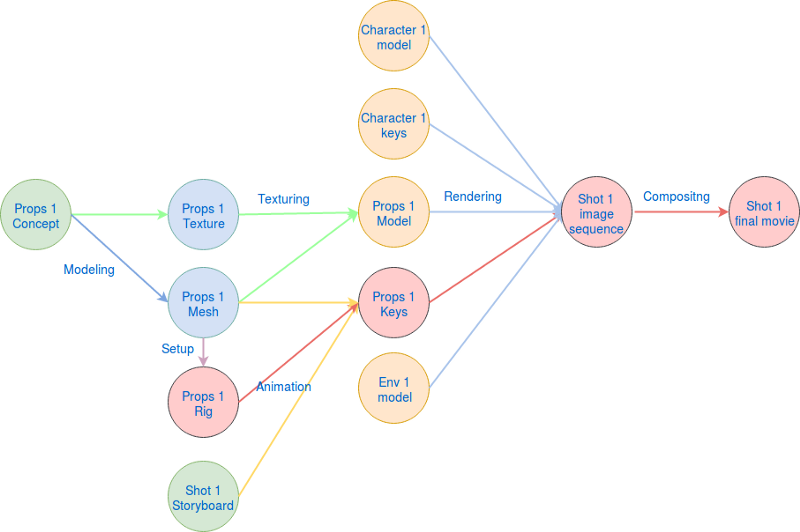
Once you think in assets, the natural next step is to represent their relationships as a directed graph:
- Nodes (vertices) = assets
- Edges = workflow steps that transform one asset into another
For example:
- A Setup step takes a mesh as input and produces a rig as output
- A Lighting step takes a layout, shaders, and FX as input and produces a lit render
This graph structure makes implicit knowledge explicit. Instead of relying on a supervisor's memory to know that "the rig depends on the base mesh," the dependency is recorded and queryable.
When a retake comes in on an approved asset, a graph representation immediately answers: what else is downstream of this change? Without it, you're relying on someone to manually notify every affected department.
Draw the dependency graph for one asset type (e.g., a prop) and one shot type in your pipeline. Use it in your next production meeting to align the team on what "upstream" and "downstream" mean in practice.
Track Dependencies, Not Just Status
Most production tracking tools answer "what is the status of this task?" A dependency-aware system also answers:
- "What does this asset depend on?"
- "What will break if I change this asset?"
- "Is this asset safe to validate, or are its inputs still in flux?"
This is proactive production management.
For every asset type in your pipeline, define:
- Its inputs (what it depends on)
- Its outputs (what depends on it)
- The validation criteria that must be met before downstream work can proceed
Kitsu by CGWire lets you define custom task types and workflows per project, so you can map your dependency graph directly into your task structure. When a texture task is validated in Kitsu, the downstream look-dev tasks can be automatically flagged for update, keeping everyone in sync without manual chasing.
Make Retake Impact Visible
One of the most expensive problems in CG production is a late-stage retake on a foundational asset like a rig, a base mesh, or a key texture. Without a dependency map, the ripple effect is invisible until it hits deadlines.
With a proper graph, you can immediately visualize which shots use a given asset, which downstream tasks have already been validated (and may need to be revisited), or the minimum set of re-renders required.
The next time a retake comes in, walk the dependency graph explicitly before communicating the impact to the team. List every downstream asset or task that is affected, and flag them in your tracking system.
Kitsu's asset casting feature links assets directly to shots and sequences. When an asset changes status, it's easy to pull up every shot that uses it and assess the retake scope.
Build a Shared Language Across the Team
A production graph is also a communication tool. When a CG artist, a supervisor, and a production manager all refer to the same graph, conversations become faster and less error-prone. "The rig is blocking the animation" means something precise when everyone can see the dependency between those two nodes.
Share a simplified version of your production graph with the full team at the start of production. Use it in milestone reviews to show where blockers are and what's on the critical path.
Kitsu's web interface gives every stakeholder a real-time view of production status across all assets and shots. No one needs to ask "what's the status of X?" because the answer is always a few clicks away.
The investment in building this structure pays off quickly. Less time spent on "who was supposed to update what," more time spent making great work.