

CG artists are the heart of your production.
But keeping the right information about them without micromanaging or creating unnecessary overhead is one of the most overlooked parts of running a studio well.
If you get it right, task assignment becomes faster and follow-up becomes easier.
Here's a practical breakdown of what to track, why it matters, and how CGWire's Kitsu makes it manageable.
1. Contact Information
- Full name
- Email address
- Phone number
- LinkedIn profile and/or portfolio URL
- An avatar (photo or any visual identifier)
CG studios rely heavily on freelancers who rotate between projects and companies. When you need to reach someone fast or verify who you're looking at, having clean, up-to-date contact info is key.
When onboarding any artist, staff or freelance, create their profile immediately rather than working off spreadsheets or scattered emails. The avatar matters: a visual identifier lets production managers scan a list and immediately know who's who.
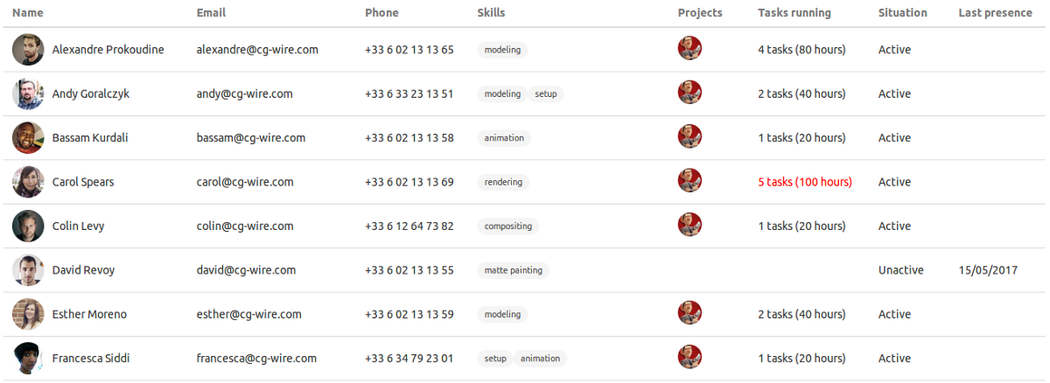
In Kitsu, each artist has a dedicated profile page where you can store contact details, a profile picture, and social/portfolio links. It gives your whole team a single source of truth.
2. Active vs. Inactive Status: Know Who's Actually Available
When you're managing tens of artists, you need to track whether a given artist is currently working with your studio, the date they last worked with you, and a reminder flag for artists who may be re-engageable.
Studios waste time contacting unavailable people or, worse, assigning tasks to someone no longer active in their pipeline. Filtering your talent pool by active status alone can cut scheduling friction significantly.
Make it a habit of updating an artist's status the moment they finish a contract or go on hiatus. Set a date stamp so you know when to follow up, especially for reliable freelancers you'd want to call back.
Kitsu allows you to mark people as active, inactive, or in day-off and filter your people list accordingly. Inactive artists are automatically excluded from production tools to avoid security headaches.
3. Current Workload: Prevent Burnout and Bottlenecks
During production, you need to know which project(s) each artist is assigned to, how many tasks they currently have open, and whether their workload is balanced relative to the team
Without visibility into who's doing what, you risk two common problems: overloaded artists burning out mid-production, and artists sitting idle waiting for new assignments.
Before assigning a new task, check the artist's current task count. If someone has five open shots and another has one, the math is easy. You just need a clear dashboard view.
Kitsu's dashboards show task assignments per person across projects. You can instantly see who's at capacity and who has bandwidth to make task allocation straightforward.
4. Skills: Assign the Right Work to the Right Person
Assigning a rigger to a compositing task (or vice versa) wastes everyone's time. Even in small studios where people wear many hats, knowing what each person is genuinely good at or what they prefer leads to better output.
Ask artists directly what they prefer to work on during onboarding or project kickoff. Keep the skill list simple: a flat list of disciplines is far more usable than trying to grade expertise levels that change over time.
You can assign each Kitsu user to a department matching their skills to make it easy to filter your team when you need a specific discipline for an incoming task or a new project phase.
5. Rate and Salary Data: Budget Without Surprises
Accurate budget forecasting depends on knowing your labor costs. An artist's rate being higher than expected, or forgetting to factor in a freelancer's day rate, can blow a production budget quickly.
Make sure to store salary and rate information, but be deliberate about who can see it. This data is sensitive and shouldn't be visible to everyone in the studio. Use a role-based permission system or maintain a separate internal record like Kitsu's.
We support user roles and permission levels, so you can restrict sensitive financial information to producers and studio management while keeping the general artist profile visible to the broader team.
Key Takeaway
The goal isn't to track everything about everyone but to have the right information available at the right moment. A producer shouldn't have to dig through emails or ask around when they need to assign a rigging task at 9am on a Monday. The answer should be one click away.
That's exactly what CGWire's Kitsu is built for: a straightforward production management platform designed for studios of all sizes, where the people list is a living tool. Contact details, skills, workload, and status... all in one place, always up to date.
If you're still managing your team in a spreadsheet, that's the first thing to fix.